What are the Fida instrument specifications?
The newest Fida instrument is Fida Evolve, and the earlier models are Fida 1 and Fida Neo. All three measure the size and binding affinity of molecules in solution, using Flow Induced Dispersion Analysis (FIDA).
Fida instrument specifications
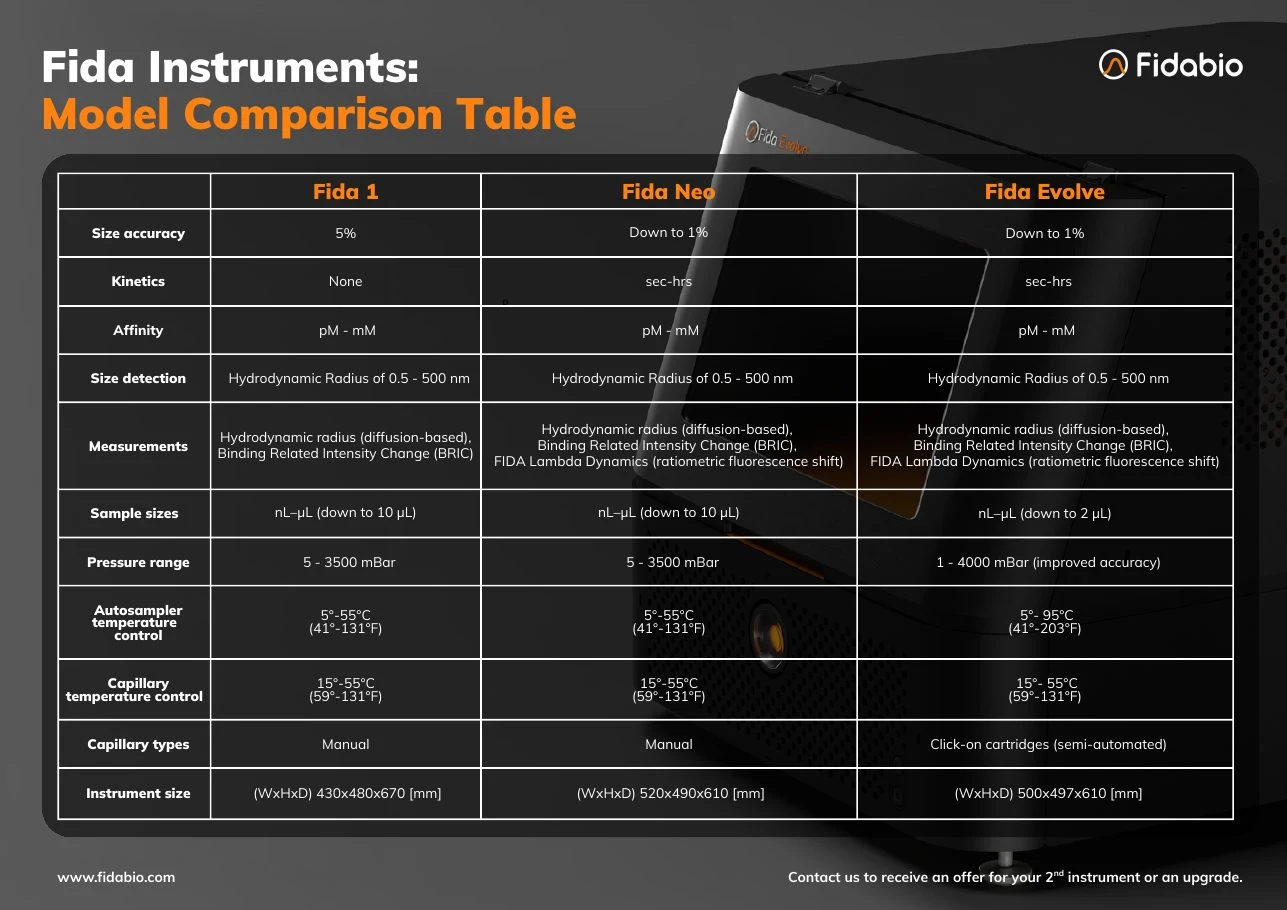
Measurements: Fida instruments measure hydrodynamic radius (diffusion-based) from 0.5 to 500 nm, Binding Related Intensity Change (BRIC) and FIDA Lambda Dynamics (ratiometric fluorescence shift). Affinity ranges from pM to mM, kinetics from seconds to hours, and size accuracy goes down to 1%. On Fida 1, size accuracy is 5%, and Lambda Dynamics and kinetics are not measured. See How to measure binding kinetics in solution?
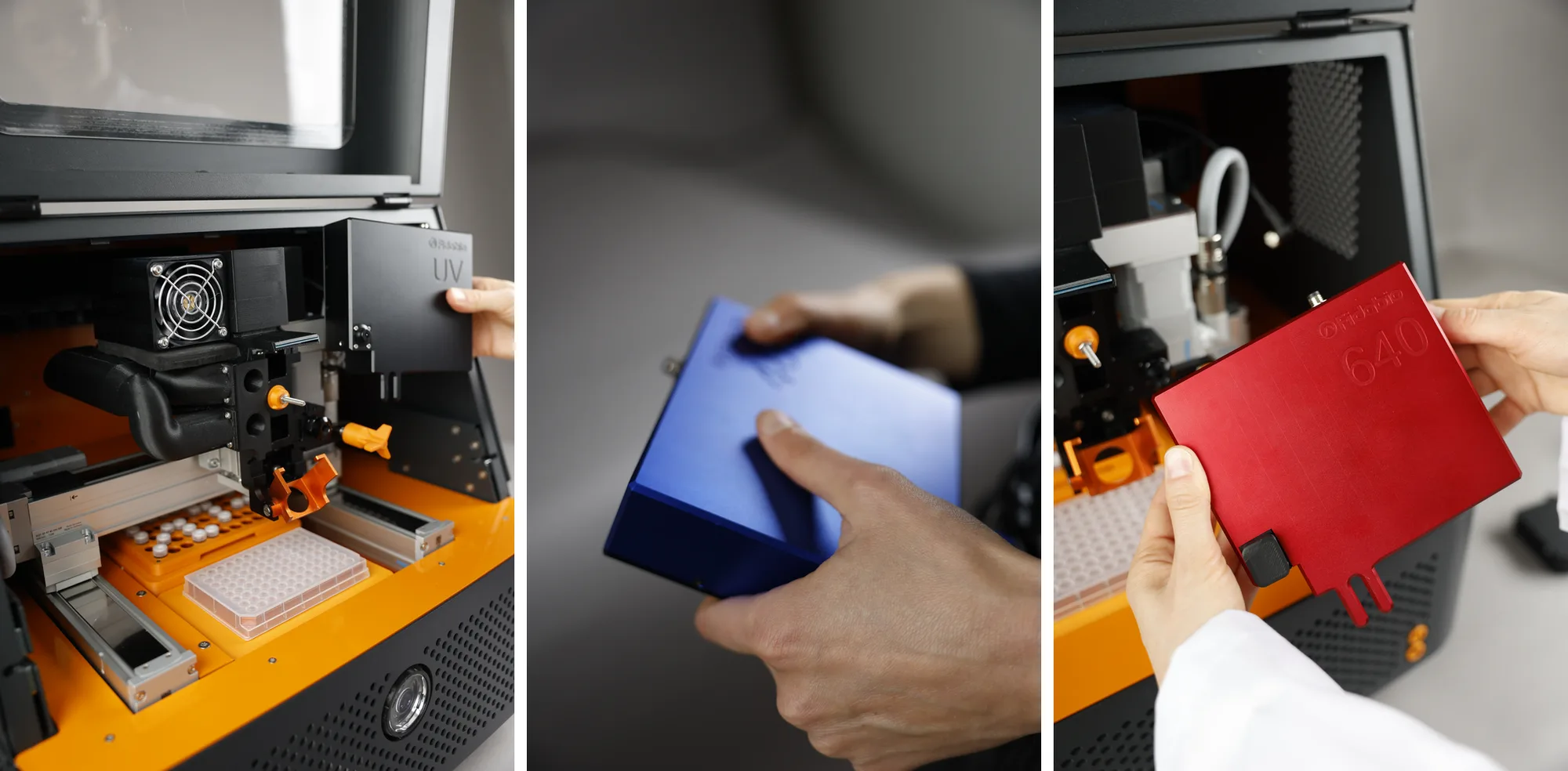
Detection: detection is based on fluorescence, labelled or intrinsic. The available detectors are 280 nm (UV, label free), 480 nm, 530 nm and 640 nm, as listed in the Hardware Basics course on the Fidabio Learning Hub. Which detector suits your label is covered in the Choosing the right detector wavelength course on the Learning Hub, and how the signal is detected in How does the Fida instrument detect a signal?
On Fida Evolve, the detectors are click-on units mounted inside the instrument: you swap one by loosening a single screw, with no fibre optics to route through the side, as shown in the webinar The new Fida Instrument: Fida Evolve: how does it differ and what do the users think? On Fida 1 and Fida Neo, the detectors are external units connected to the capillary by an optical cable, as described in the Hardware Basics course on the Fidabio Learning Hub.
Samples and pressure: sample sizes run from nL to µL, down to 2 µL on Fida Evolve (10 µL on Fida 1 and Fida Neo). The pressure range on Fida Evolve is 1 to 4000 mbar, for improved accuracy (5 to 3500 mbar on Fida 1 and Fida Neo). How much sample each run consumes is in How much sample do you need to measure binding affinity and size?, and which samples and buffers you can use is in What samples and buffers can you measure with FIDA?
Capillaries: Fida Evolve uses click-on capillary cartridges (semi-automated); on Fida 1 and Fida Neo, capillaries are mounted manually. See Which capillary should you use, and how do you look after it?
What is the temperature range on Fida Instruments?
There are three independent temperature controls: the temperature of the capillary compartment, as well as the two sample trays. The sample trays can be independently set, ±1 degree, from 5 to 95 °C (41 to 203 °F) on Fida Evolve and from 5 to 55 °C (41 to 131 °F) on Fida 1 and Fida Neo. The capillary compartment can be set between 15 °C and 55 °C (59 to 131 °F) on all models. Cooling to 5 °C assumes a room temperature of 22 °C or below.
How much bench space do I need? / What is the footprint?
Fida Evolve has a footprint (width × depth) of 500 × 610 mm and a height of 497 mm. For the earlier models, the footprint is 520 × 610 mm for Fida Neo and 430 × 670 mm for Fida 1, with heights of 490 mm and 480 mm. Note that you will also need space for a PC.
Is there a mandatory maintenance on Fida Instruments?
No. Fida instruments are very robust systems which do not require calibration or day-to-day maintenance in addition to standard laboratory tidiness or cleaning. However, to ensure consistently high performance, we do provide service agreements with preventive maintenance. Ask your regional representative for an offer. If you need any technical help, contact techsupport@fidabio.com.
Related resources
The product page presents the newest Fida instrument, What does FIDA Software include? covers the software, and How to become a FIDA user? covers getting started and upgrading from Fida 1. To receive an offer for a second instrument or an upgrade, request a quote; to discuss whether FIDA fits your research, book a discovery call.